
Exzellent LinguaCC. Learn from what you watch.
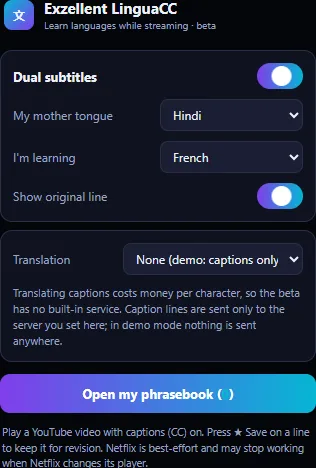
Turn captions on in a YouTube video and LinguaCC shows each line twice under the player: in the language you are learning and in your mother tongue. Save a line and it goes into your phrasebook, for flashcards later or a CSV export.
What it does
Dual subtitles from real captions
LinguaCC reads the caption track the video already has (captions must be on) and shows the line in your learning language and your mother tongue. It never invents a transcript: no captions, no subtitles.
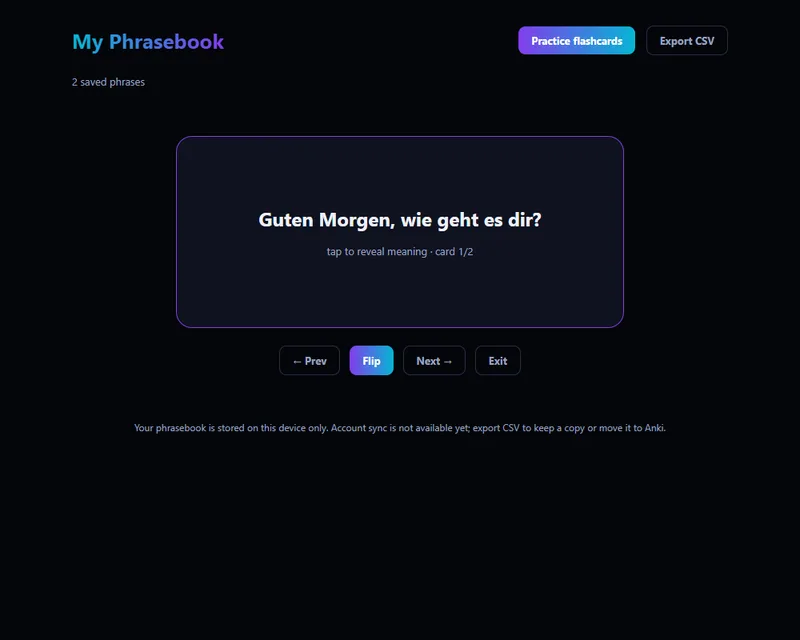
Phrasebook
Press Save on a line worth keeping. The original, both translations, the video title and link and the date are stored on your device. Delete any line later.
Flashcards and CSV
Practise saved lines as flashcards (learning language first, flip for the meaning) or export the phrasebook as CSV for Anki, Quizlet or a spreadsheet.
28 languages
English, Hindi, Bengali, Tamil, Telugu, Kannada, Malayalam, Marathi, Gujarati, Punjabi, Urdu, German, French, Spanish, Italian, Portuguese, Dutch, Polish, Russian, Ukrainian, Turkish, Arabic, Chinese (Simplified), Japanese, Korean, Vietnamese, Indonesian, Thai. Whether a pair translates well depends on the translation server you use.
YouTube first, Netflix best-effort
YouTube is the supported site. Netflix works by reading its caption elements and can stop working whenever Netflix changes its player; treat it as experimental.
Local-first
Settings and the phrasebook stay in Chrome’s extension storage. Account sync is not available; the prototype’s sync button was removed rather than left pointing at a server that does not exist.
Seen in the beta
Captured from version 0.2.0 by the automated test run in a Chromium browser on 24 October 2026, not mocked up.
Translation, honestly
Translating captions costs money per character, so the beta does not include a translation service of its own. You choose in the extension’s settings:
- Your own LibreTranslate server. Enter its address; LinguaCC asks Chrome for permission to reach that one site and sends each caption line there. Good for a class or a self-hoster.
- Demo mode. Shows the captions without translating, so the save, phrasebook and flashcard flow can be tried at no cost.
- Exzellent translation service: planned, not available. It would need a paid provider behind a capped, rate-limited relay. The design and the cost model are in the repository; nothing is switched on until the owner approves the spend.
Install the beta (Chrome, developer mode)
- Download the package from the downloads page and check its SHA-256 checksum against the one listed there.
- Unzip it into a folder you will keep.
- Open
chrome://extensions, turn on Developer mode, choose Load unpacked and pick the folder. - Open any YouTube video and turn captions (CC) on. Set your mother tongue and learning language in the popup, and pick a translation option.
Permissions, and why
| Permission | Used for |
|---|---|
storage | Your settings and your phrasebook, on your device. |
| Access to youtube.com and netflix.com | Reading the caption elements on the page and drawing the subtitle bar. Nothing is read on any other site. |
| Access to your translation server, asked when you set one | Sending caption lines to the LibreTranslate address you entered. No other network request is made. |
Status
- Source hardened and packaged from the owner’s prototype (beta 0.2.0): stale translations can no longer overwrite newer lines, duplicate requests are merged, CSV cells are made safe for spreadsheets, links are checked before use, the phrasebook is capped.
- Caption reading is checked with an automated test against a page shaped like YouTube’s player. A test on live YouTube depends on a captioned video being available and is run by hand.
- Not published. The package appears on the downloads page only after the owner approves a release.