
Exzellent Focus. Study without distraction.
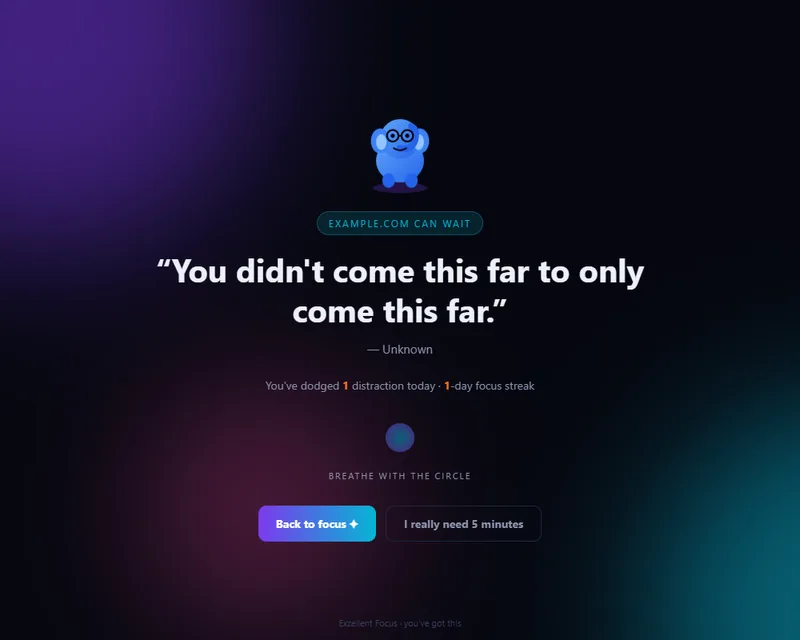
One switch blocks the sites that pull you away. A blocked page turns into a quote, the number of distractions you have dodged today, your day streak and a breathing circle. When you must, an honest 5-minute pass lets a site through and blocks it again on its own.
What it does
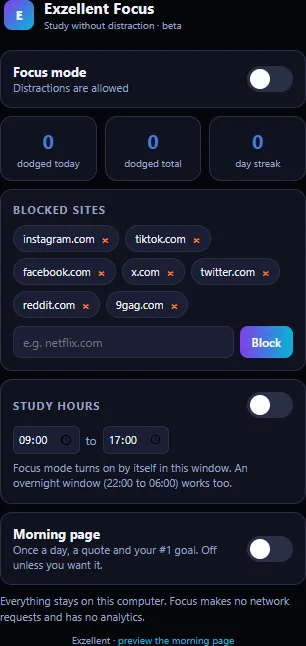
Focus mode
One toggle blocks a starter list (Instagram, TikTok, Facebook, X, Reddit, 9GAG) plus any site you add. Blocking uses Chrome’s declarative rules, so it works without reading your browsing.
Motivation page
Instead of the blocked site: a quote, how many distractions you dodged today, your streak and a slow breathing circle. “Back to focus” closes the tab; “I really need 5 minutes” lets the site through for five minutes.
Study hours
Set a daily window (overnight windows work too) and Focus mode switches on by itself. Outside the window, nothing is blocked unless you turn the switch on.
Stats and streaks
Distractions dodged today and in total, and a streak of days with at least one dodge. Counted on your device only.
Morning splash, if you want it
Opt in to a once-a-day page with a greeting, a quote and your number-one goal for the day. Off by default in the beta; nothing opens on install.
Your lists, your device
The block list, schedule, goal and statistics live in Chrome’s extension storage on your computer. The extension makes no network requests and has no analytics.
Seen in the beta
Captured from version 0.2.0 by the automated test run in a Chromium browser on 24 October 2026, not mocked up.
Install the beta (Chrome, developer mode)
Until the extension is on the Chrome Web Store, it installs from a downloaded folder. Chrome shows a “developer mode extensions” notice at start-up for extensions installed this way; that is expected.
- Download the package from the downloads page and check its SHA-256 checksum against the one listed there (
certutil -hashfile file.zip SHA256on Windows,shasum -a 256 file.zipon macOS). - Unzip it into a folder you will keep (Chrome loads the extension from that folder; moving it later breaks the install).
- Open
chrome://extensions, turn on Developer mode (top right), choose Load unpacked and pick the unzipped folder. - Pin Exzellent Focus from the puzzle-piece menu, open it and turn on Focus mode. The first time, Chrome asks for permission to act on the sites in your block list.
- Try opening one of the blocked sites. You should land on the motivation page.
Permissions, and why
| Permission | Used for |
|---|---|
storage | Your block list, schedule, goal and statistics, on your device. |
declarativeNetRequest | Redirecting a blocked site’s main page to the motivation page. Chrome evaluates these rules itself; the extension does not see your traffic. |
alarms | Checking the study-hours window once a minute and ending a 5-minute pass. |
| Site access, asked per site | Chrome requires permission for each site a redirect rule applies to. The beta asks when you turn Focus mode on and when you add a site; the earlier prototype asked for all sites at install, which the beta no longer does. |
Status
- Source hardened and packaged from the owner’s prototype (version 0.2.0 of the beta). An automated test loads it in a Chromium browser and exercises blocking, the dodge count, the 5-minute pass and the schedule; the test and its results are in the repository.
- Not published. The package appears on the downloads page only after the owner approves a release. A Chrome Web Store listing needs a developer account and a review; that is a later step.